< DRAG >

Pinga® VR · Voice recognition

Dictate. Sign. Done.

Voice recognition built for radiology reporting. Open a draft made for the exam, dictate, review and sign by voice.

See the difference

Works with any RIS and PACS, or built into Pinga® RIS+.

Live with radiology clients in Canada and New Zealand

  • A draft, not a blank pageEach exam opens with its own template, and details already captured in Pinga® are carried into the report.
  • Recognition that’s personalAdapts to each radiologist’s voice, dictation style and terminology.
  • Bring your templatesWe import your existing templates and macros. Standard phrases are inserted by voice.
  • Reporting by voiceMove between fields, insert phrases and sign after review, hands on the images.
  • Context beside the reportHistory, priors and the tech sheet stay on the same screen.
Reviewing your dictation software? Keep your templates and your workflow.See how switching works

Client story

Same clinical review. No transcription queue.

One multi-site imaging provider used to send every dictation to a typing team. Now radiologists dictate into the draft, review and sign it themselves, and results reach referrers sooner.

Before

Two teams, one queue, a cost per report
  1. DictateRadiologist
  2. Transcription queueWaiting on typists
  3. ReviewRadiologist
  4. SignRadiologist

With Pinga® VR

One workflow, no separate queue
  1. Pre-populated draftExam-specific
  2. Dictate directlyText as you speak
  3. ReviewRadiologist
  4. SignBy voice

Clinical review stays with the radiologist. The wait for transcription is what goes.
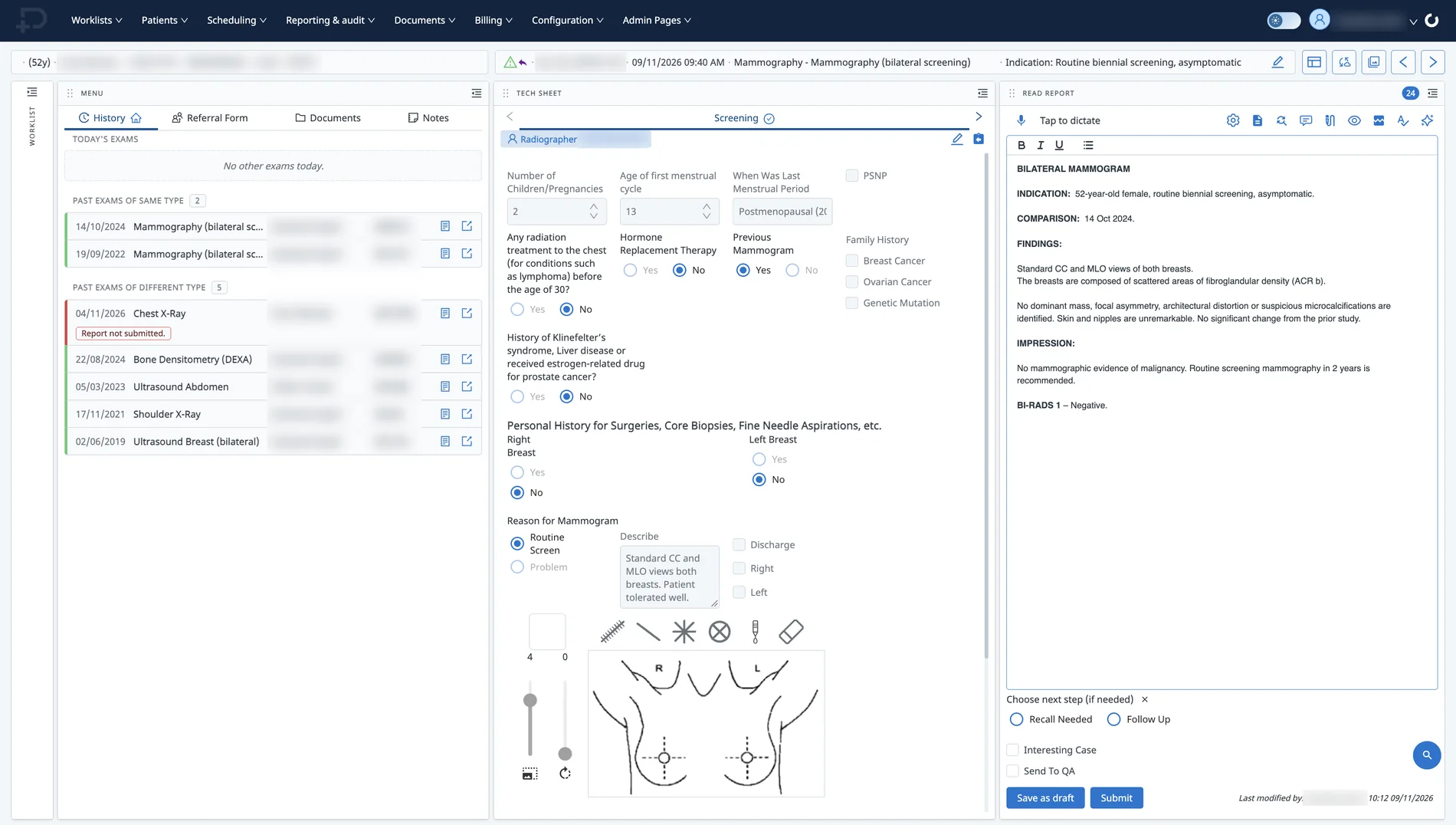
Reporting, your way

Everything for the read, on one screen

Pinga reporting workspace for a bilateral screening mammogram: patient history and prior exams, the screening tech sheet, and the report with Tap to dictate
1History, referral and prior exams2The technologist’s tech sheet3The report, with Tap to dictate built in
Standalone

Works with any RIS and PACS. Change your dictation software and nothing else.

Pinga® RIS+

Everything on one record, from referral to billing to results.

Reviewing your dictation software?

Your dictation software is changing. Your workflow doesn’t have to.

  1. 1. ReviewYour current setup
  2. 2. ImportTemplates and macros
  3. 3. Go liveWith 24/7 support
  • Do I have to change my RIS or PACS?No. Pinga® VR works with the systems you already have.
  • Will it recognise my voice?It adapts to each radiologist. Try it with your own dictation in the demo.
  • Can I keep my templates?Yes. We import your existing templates and macros.
  • Who supports the switch?Our teams in Wollongong and Skopje, with support 24/7/365.

Built on Pinga®

A platform proven at national scale

10M+patients managed
55K+daily users
330clinical centres
On working with Sorsix
Every member of the team shares the same can-do attitude, and, most importantly, they deliver on their promises.
Dr. Danielle Walker, MD, FRCPCCEO, Wentworth-Halton XR & US · Associate Professor, Department of Radiology, McMaster University

Questions

Quick answers

Do we need Pinga® RIS+ to use Pinga® VR?

No. Pinga® VR works standalone with any RIS and PACS. Inside Pinga® RIS+, it is part of one record from referral to results.

What can I do by voice?

Dictate findings, move between report fields, insert standard phrases and sign the report after you’ve reviewed it.

Can we bring our templates and macros?

Yes. We import your existing templates and macros, so radiologists keep the report structures they know.

What support do we get?

Our teams in Wollongong and Skopje support you through the switch and after go-live, 24/7/365.

Does it learn how I dictate?

Yes. Pinga® VR adapts to each radiologist’s voice, dictation style and terminology.

Pick an Exam Type.
We’ll Report It Together.

See Pinga® VR on the studies you read every day, from draft to signed report.